How many LinkedIn connection requests can you send per week and month?
Most guides say the LinkedIn connection request limit is 100 a week. That is where new accounts start, not the cap. A Basic account in good standing can send 150 to 200 connection requests per week, and Sales Navigator up to 200, which is 600 to 800 per month. Here are the 2026 limits by account type, what counts toward them, and how to raise yours without getting restricted.
A Basic (free) LinkedIn account in good standing can send 150 to 200 connection requests a week, and a Sales Navigator account up to 200. That is 600 to 800 requests a month. New or rarely used accounts start lower, around 50 to 75 a week, and established accounts around 100. LinkedIn doesn’t publish a fixed number: your limit grows with your account’s reputation and acceptance rate. LinkedClient sends up to 30 requests a day within the limits you set. Run it 5 to 7 days a week and that is 150 to 200 requests a week, or 600 to 800 a month.
Key takeaways
- Good standing: 150 to 200 requests a week on Basic, up to 200 on Sales Navigator.
- Per month: 600 to 800 requests.
- New accounts: start at 10 to 15 a day and build up.
- A high acceptance rate is what unlocks the higher limits.
- Hit the limit and LinkedIn typically blocks new invitations for about a week.
What are the LinkedIn connection request limits in 2026?
| Account | Per day | Per week | Per month |
|---|---|---|---|
| New or rarely used account | 10 to 15 | 50 to 75 | 200 to 300 |
| Established account | 20 to 25 | About 100 | About 400 |
| Basic account in good standing, high acceptance rate | Up to 30 | 150 to 200 | 600 to 800 |
| Sales Navigator | Up to 30 | Up to 200 | Up to 800 |
These are the ranges LinkedClient works within across customer accounts. Your exact limit depends on the age and activity of your account, your acceptance rate and how many of your requests are still pending. Weekly numbers depend on how many days a week you send.
Two limits LinkedIn does state: you can have at most 30,000 connections, and if you withdraw a request you can’t invite the same person again for up to 3 weeks.
Does Premium or Sales Navigator raise the limit?
| Plan | Requests per week | Personal notes |
|---|---|---|
| Basic (free) | 150 to 200 in good standing | LinkedIn limits free accounts to a few personal notes a month |
| Premium | Same as Basic | Unlimited |
| Sales Navigator | Up to 200 | Unlimited |
Paying for LinkedIn mostly buys you unlimited personal notes, not a much higher weekly cap. LinkedIn says all members, Basic and Premium, are subject to invitation limits. On a free account, a profile visit and a like before the request do the warming up that a note would otherwise do.
What counts toward the weekly limit?
| Action | Counts toward the limit? |
|---|---|
| Sending a connection request, with or without a note | Yes |
| Accepting someone else’s request | No |
| Messaging people you are already connected to | No, messages are counted separately. See the LinkedIn message limit |
| InMail | No, InMail uses separate monthly credits. See InMail credits by plan |
| Following someone | No |
| Visiting a profile or liking a post | No, but keep these at a natural pace too |
How do you get to 600 to 800 requests a month?
Start at 10 to 15 a day
A new or quiet account should begin low and raise the daily number every week or two.
Keep your acceptance rate above 30%
LinkedIn rewards requests people accept. See what a good acceptance rate is.
Warm people up first
Visit their profile and like a recent post before you connect. Warm requests get accepted far more often.
Keep pending requests under 500
Withdraw requests that have been pending for 2 to 3 weeks, so unanswered invitations don’t pile up. See how to withdraw them.
Spread requests over working days
30 a day on working days beats 150 on a Monday.
Stop if you get a warning
If LinkedIn restricts invitations, pause for the week and restart at a lower daily number.
Want the full sequence? Read how to automate LinkedIn connection requests safely.
How does LinkedClient get you to 600 to 800 a month?
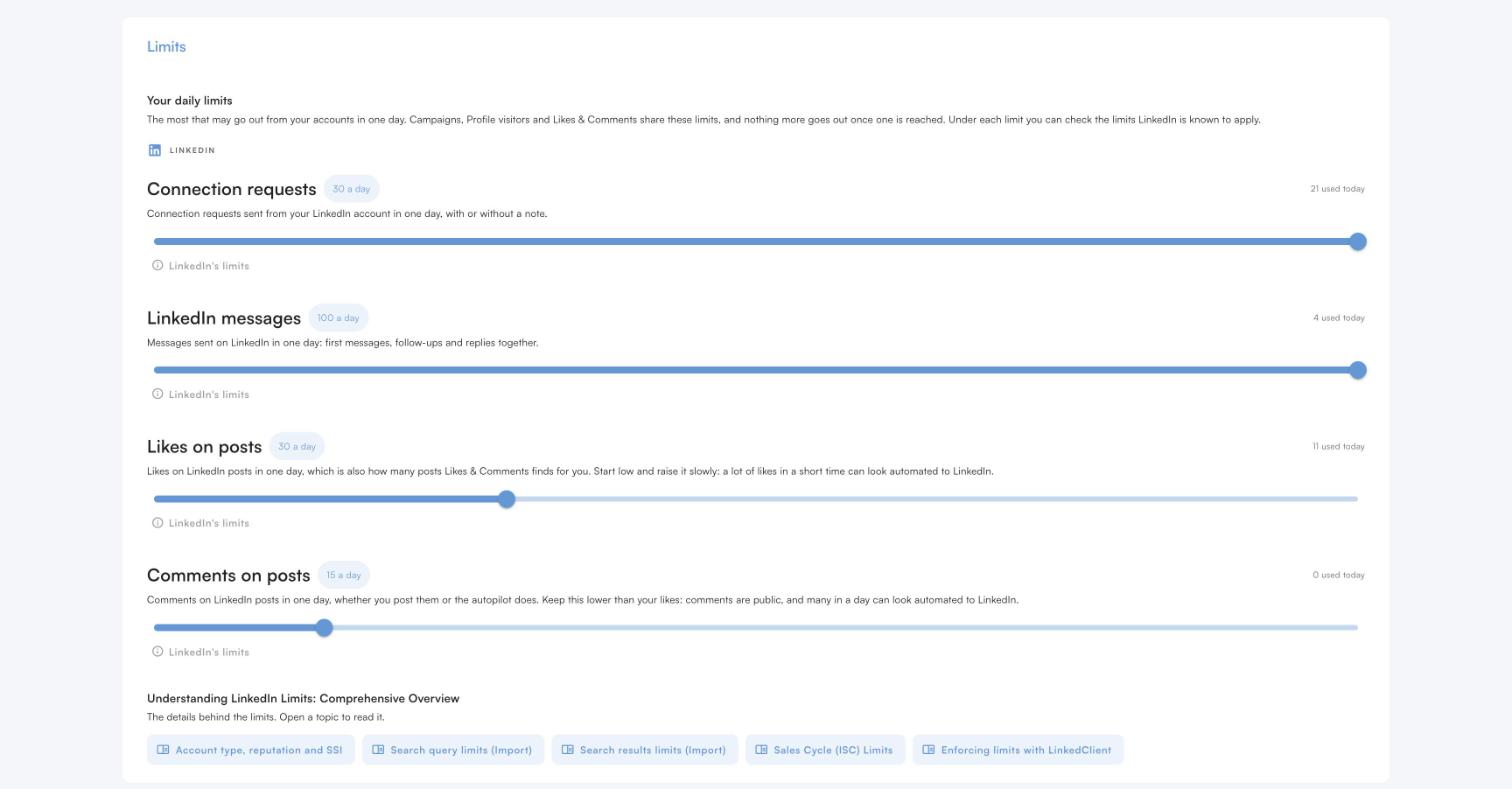
Up to 30 requests a day
Connection requests have their own daily limit, up to 30, and Elsie never goes over it.
Only in your working hours
Requests are spread over your working day, never sent in bursts.
Visit and like first
Each person gets a profile visit and a like on their latest post before the request.
High acceptance
Elsie writes to people who fit your ideal customer, which keeps your acceptance rate and your limit high.
A note where your plan allows
On Premium or Sales Navigator every request can carry a note written for that person.
Welcome on accept
When someone accepts, Elsie sends your welcome message and keeps the conversation going.
Send 600 to 800 requests a month, safely
Try it free for 14 days, no card needed, or book a 30-minute demo and we’ll show you who Elsie would contact for your business.
What results do LinkedClient customers get?
These results cover all of LinkedClient. Connection requests are one part of it.
“We can pinpoint the people we want to contact and actually get meetings with them automatically.”
Keep reading
Automate connection requests
The warm-up sequence that gets more people to accept.
Read the guideAcceptance rate
What a good rate is and how to raise yours.
Read the guideLinkedIn shadow ban
Reduced reach, LinkedIn jail and how to avoid both.
Read the guideIncoming connection requests
Accept and greet everyone who asks to connect.
Read the guideMore sales guides
Cold outreach
LinkedIn vs email, what to write and how to get replies
Read the guideHow to use LinkedIn Sales Navigator
Searches, lists and alerts that find buyers
Read the guideSales cadence
How many touches, which channels and how far apart
Read the guideOutbound sales
How it works, outbound vs inbound and how to start
Read the guideFrom accepted requests to booked meetings
An AI sales assistant. Elsie finds leads, writes to them on LinkedIn and email, answers replies and books meetings. 14 days free, no card needed.
Questions about LinkedIn connection request limits
Can’t find your answer? Ask a real person.
Book a 30-min demoHow many LinkedIn connection requests can I send per week?
A Basic account in good standing can send 150 to 200 a week, and Sales Navigator up to 200. New accounts start around 50 to 75 a week and established accounts around 100.
How many LinkedIn connection requests can I send per month?
600 to 800 a month once your account is in good standing and your acceptance rate is high. New accounts should expect 200 to 300 a month at first.
Does Sales Navigator increase the connection request limit?
Sales Navigator accounts can send up to 200 a week and add a personal note to every request. A Basic account in good standing gets close, at 150 to 200 a week.
What happens when I hit the weekly invitation limit?
LinkedIn may restrict you from sending invitations, and the restriction typically lasts one week. Withdrawing pending invitations doesn’t lift it, and LinkedIn can’t shorten it. You can still message your existing connections.
How many personal notes can a free LinkedIn account send?
LinkedIn limits free accounts to a few personalized invitations a month. Premium and Sales Navigator have no cap on notes.
What is the maximum number of LinkedIn connections?
30,000. After that, people can follow you but can’t connect.
How does LinkedClient help me send more connection requests?
Elsie sends up to 30 requests a day within the limits you set, warms each person up with a profile visit and a like, and writes to people who fit. A high acceptance rate is what lets you reach 600 to 800 requests a month.
Want to send 600 to 800 requests a month, safely?
Start your free 14-day trial and Elsie can start this week. Or book a 30-minute demo and we’ll show you who she would contact for your business.
14 days free · No card needed · Human onboarding included