AI LinkedIn outreach
that books meetings for you
Describe who you want to reach. LinkedClient finds them, reaches out on LinkedIn and email, handles the replies and books meetings in your calendar.
- 14 days free
- No card needed
- Works on any LinkedIn account
Prefer a walkthrough? Book a 30-min demo
From one sentence to a booked meeting
Here's exactly what LinkedClient does for you, step by step, from your own LinkedIn and your own inbox.
- Gmail
- Outlook
- Google Calendar
- Outlook Calendar
- 1
Describe who you want to reach
Write one sentence about your ideal customer. LinkedClient finds the right people, researches every lead and builds the whole campaign for you, ready to launch.
LinkedIn connectionsLinkedIn messagesEmailAttach imagesLike postsComment on postsVisit profileInvite to company pageCustom placeholders
- 2
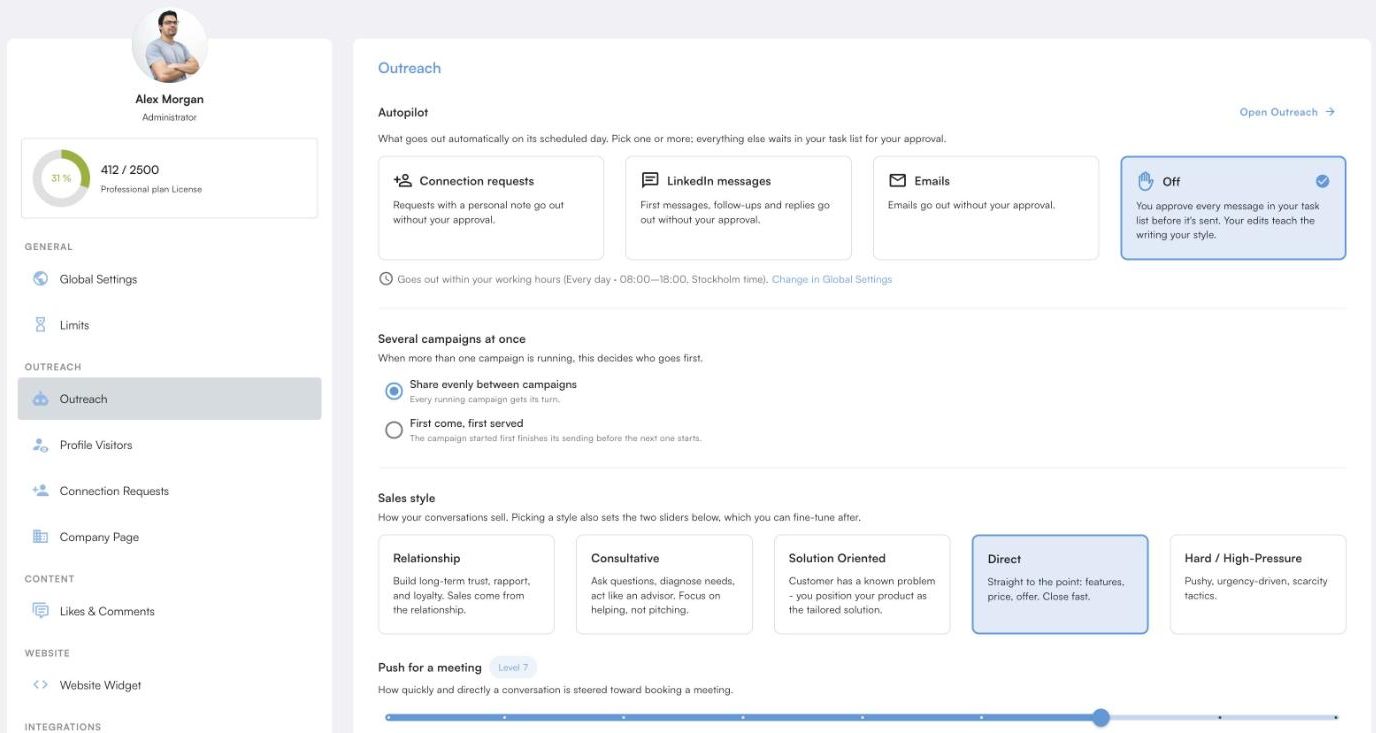
Decide how much the AI does
Let LinkedClient run everything on autopilot until the meeting is booked, or approve every message yourself. Choose it per channel, pick a sales style and set how hard it pushes for a meeting. You can take over any conversation, any time.
- Autopilot or approve, channel by channel
- Your sales style, your pace towards the meeting
- Only sends within your working hours
- 3
It connects, messages, emails, likes, comments and visits
LinkedClient sends the connection request, follows up with LinkedIn messages and emails from your own inbox, and keeps you visible in between. It visits your leads’ profiles, likes their latest posts, writes a comment that adds to the conversation and invites them to follow your company page, so they know you before you meet.
Connection requestsLinkedIn messagesEmailsLike postsComment on postsVisit profileInvite to company page
- 4
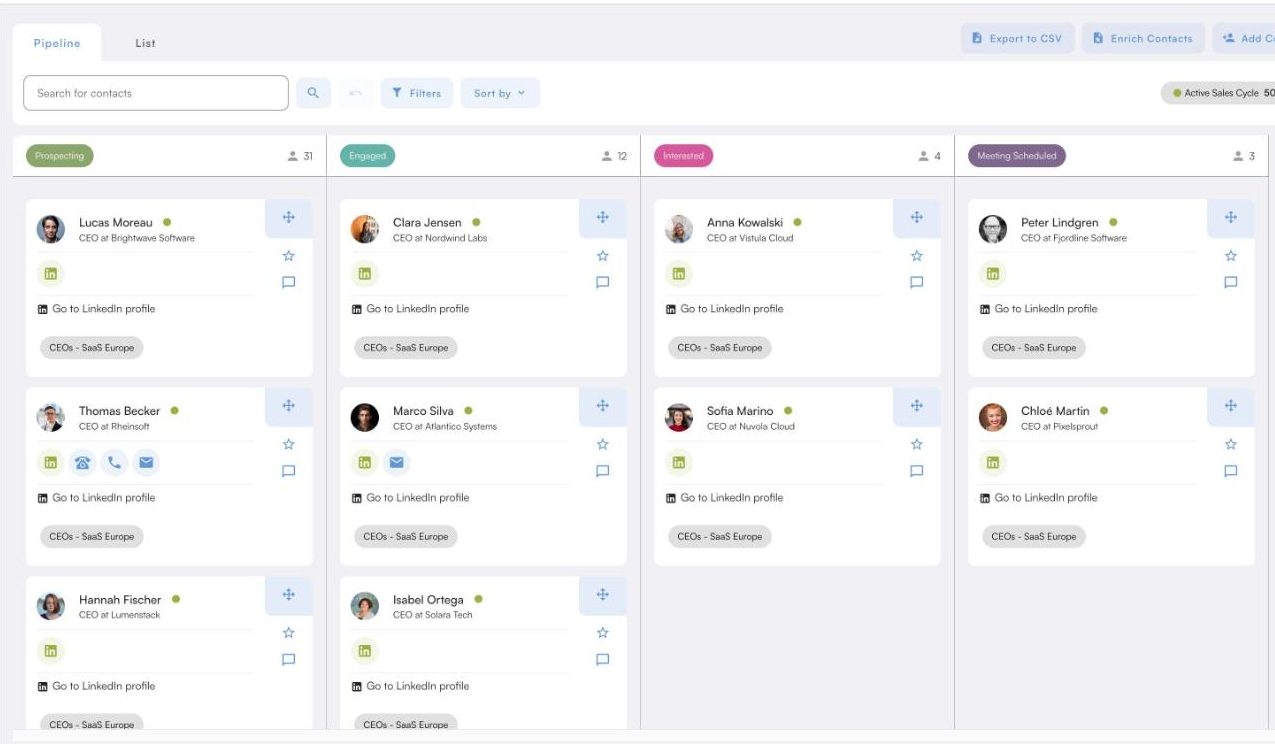
Your CRM updates itself
Every reply, status and next step is logged for you. Leads move through your pipeline from prospecting to meeting scheduled as the conversations move forward, without you typing a thing.
- Statuses and notes update from every conversation
- Leads move from prospecting to meeting scheduled on their own
- 5
Meetings land in your calendar
When a lead says yes, LinkedClient books the meeting at a time you’re actually free and sends the invite. It works with your Google or Outlook calendar, your meeting length and your availability.
- No calendar links: the meeting is booked in the conversation
- Choose the meeting length, hosts and the hours you can be booked
Google CalendarOutlook Calendar
Works with the tools your team already uses
LinkedClient connects to your CRM, calendar and inbox, and to almost any other tool through its public API and webhooks.










Customers who book more meetings with LinkedClient
Real customers, in their own words. Press play.






 GRW Media
“I didn’t think it was true, but when I got access and saw [LinkedClient] chatting and booking meetings for me…”
“With LinkedClient, I can maintain active sales work and fill our pipeline, even though I can’t allocate the time myself.”
Lucas LindströmCEO & Founder, GRW Media“We can pinpoint the people we want to contact and actually get meetings with them automatically.”
More proof: how Hard Call Sales booked their first 100 meetings for €17 each →
Simple plans. More sales meetings.
Onboarding with a human is always included.
Starter and Professional: per user, excl. VAT.
Starter
per month
per month
- Includes
- All 109 platform features
- AI sales assistant that writes and replies for you
- Onboarding and coaching
- Support by in-app chat and email
Professional
per month
per month
- Everything in Starter, plus
- Room for your whole sales team
- Everyone’s pipeline in one view
- Statistics for your whole team
- Add users whenever you need
Done for you
- What you get
- Runs in your own LinkedClient account
- Our team sets up and runs your outreach
- Meetings booked in the conversation, no calendar links
Agency, consultancy or software company? Sell LinkedClient under your own brand. White label →
See full pricing and all features →
Want to try it first? Start your 14-day free trial, no card needed.
Not sure which plan fits? Book a 30-minute demo and we’ll help you choose.
Questions before you start
Everything new customers usually ask us. Can’t find your answer? Ask a real person.
We’ll answer your questions and show you who LinkedClient would contact for your business.
Book a 30-min demoWhat is LinkedClient?
LinkedClient is software that books sales meetings for you. Its AI finds and researches the people you want to reach, writes to them on LinkedIn and email, likes and comments on their posts, follows up, answers the replies and books meetings in your calendar.
Do I need LinkedIn Premium or Sales Navigator?
No. Every LinkedClient feature works on any LinkedIn plan: Basic (free), Premium, Sales Navigator and Recruiter. If you have Sales Navigator or Recruiter, you can import their searches too.
Does LinkedClient send calendar links?
No. When a lead is interested, LinkedClient agrees a time in the conversation, handles the back-and-forth and books the meeting in your calendar. Your prospect never has to pick a slot on a booking page.
How many meetings will I get?
It depends on your market and your offer. See what our customers get, then book a 30-minute demo and we’ll look at your market together.
How much of my time does it take?
Setup takes about 15 minutes, with our team. After that, reviewing the AI’s messages takes 0 to 20 minutes a day, depending on how much you want to edit. As it learns your style, it gets closer to zero. Or turn on autopilot and only step in when you want to.
Is my LinkedIn account safe? Will it spam my network?
LinkedClient works within LinkedIn’s daily limits. You set a daily limit for every action, it only sends within your working hours, and every message is written for one person based on research about them. You can approve every message before it goes out.
Does it work with HubSpot, Pipedrive or my CRM?
Yes. LinkedClient has a full public API and webhooks, so you can connect HubSpot, Pipedrive, Zapier or any other system. You can also export to CSV, or simply use the built-in CRM.
Is there a free trial? How does pricing work?
Yes. Try LinkedClient free for 14 days, no card needed: start your free trial. After that, prices are per user and exclude VAT. Every plan has every feature: Starter is for one person and Professional is for teams of two or more. Pay monthly and cancel anytime, or commit to 12 months, paid upfront, and save up to 25%. Want our team to run it for you? Choose Done for you, priced for your setup. See pricing
Can you run it for us?
Yes. Every plan includes onboarding and coaching. If you’d rather our team runs everything, choose Done for you: a fully managed service, priced for your setup. Read more →
Who is behind LinkedClient?
LinkedClient AB, a software company in Stockholm, Sweden, founded in 2021 by Melker Adolfsson. Our Customer Success team onboards and coaches every customer personally.
More questions about plans and billing? See the pricing FAQ →
 Meeting bookedMaria Santos · Tue 10:00
Ready for more sales meetings?
Start your 14-day free trial and launch your first campaign today. Or book a 30-minute demo and we’ll show you who LinkedClient would contact for your business.
No card needed for the trial · Plans from €199 per user/month excl. VAT · Human onboarding included
LinkedClient AB · Stockholm, Sweden · About us