How to find someone’s business email address: 7 methods that work, and the rules
You know who you want to reach, but not their email address. There are reliable ways to find it, from the company website to email finder tools, and a few rules to follow when you use it. Here are seven methods, how to check the address before you send, and what GDPR means for it.
To find someone’s business email address, check the company website and press pages first, then try the company’s email pattern, such as firstname.lastname@company.com, and verify it with an email verification tool. Email finder and enrichment tools can look up addresses by name and company, and LinkedIn sometimes shows contact details for your connections. Always verify before you send, and in the EU remember that a named business email is personal data under GDPR. LinkedClient enriches your leads automatically: it finds LinkedIn, email and phone details and keeps them up to date. You can try it free for 14 days, no card needed, and your first month after the trial is $79.
Key takeaways
- Start with the company website.
- Most companies use one email pattern.
- Verify every address before you send.
- Finder tools save time at scale.
- Business emails are personal data under GDPR.
How do you find someone’s business email address?
Check the company website
Team, contact, press and blog pages often list emails.
Guess the pattern
Find one known address at the company and apply the pattern, such as firstname.lastname@.
Use an email finder
Enter name and company domain; the tool suggests and verifies an address.
Check LinkedIn
Connections can see contact details that people choose to share.
Look at their content
Speaker bios, articles, podcasts and newsletters often include an email.
Ask a mutual connection
An introduction beats a cold email anyway.
Use an enrichment tool
Upload a list and get emails added in bulk, with verification.
What are the most common business email patterns?
| Pattern | Example |
|---|---|
| firstname.lastname | anna.berg@company.com |
| firstname | anna@company.com |
| firstinitiallastname | aberg@company.com |
| firstname.lastinitial | anna.b@company.com |
| lastname | berg@company.com |
Smaller companies often use first names only; larger ones usually use firstname.lastname. Never send to a guessed address without verifying it: bounces hurt your sender reputation.
How do you verify an email address before sending?
See cold email deliverability for why bounces matter.
- Use an email verification tool that checks whether the mailbox exists.
- Be careful with “catch-all” domains that accept every address.
- Remove addresses that bounce straight away.
- Re-verify old lists before each campaign; people change jobs.
Is it legal to find and use someone’s business email?
In the EU, an email address that identifies a person, like anna.berg@company.com, is personal data under GDPR. You need a lawful basis, often legitimate interest for relevant B2B outreach, and when you didn’t get the data from the person, Article 14 requires you to tell them where it came from within one month at the latest. Some EU countries also require consent for marketing email. In the US, follow the CAN-SPAM Act.
This is general information, not legal advice. See how LinkedClient handles data.
How does LinkedClient find email addresses for you?
Finding emails one by one is slow. LinkedClient enriches your leads automatically: it finds LinkedIn, email and phone details, keeps them up to date, and Elsie reaches each person on whichever channel works, LinkedIn or email, then books the meeting.
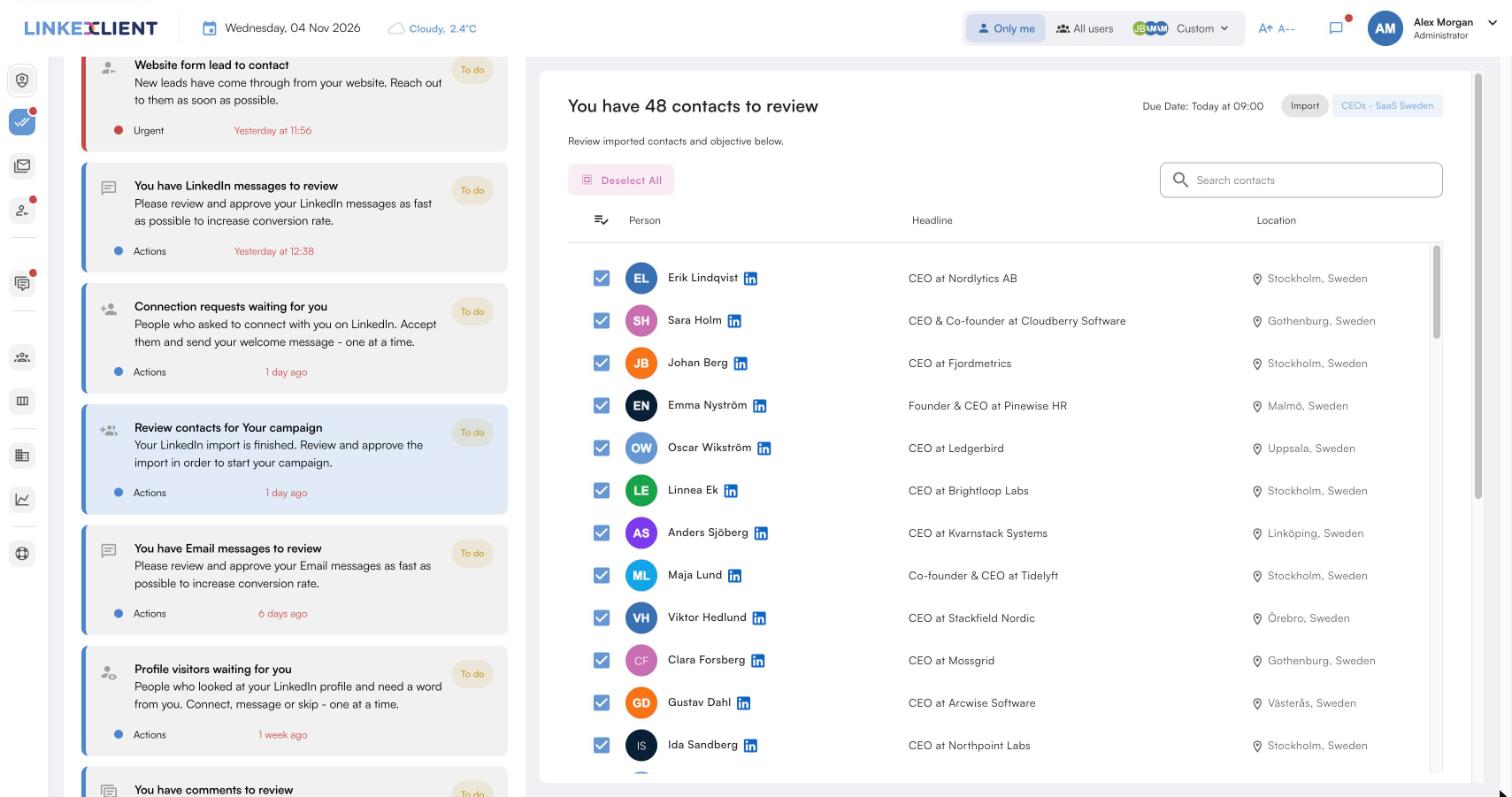
Email and phone found
LinkedClient finds LinkedIn, email and phone details and fills in what’s missing.
Continuous enrichment
Contact and company data is kept up to date over time.
LinkedIn when there’s no email
If no email is found, Elsie reaches the person on LinkedIn.
Meetings in your calendar
Elsie agrees a time in the conversation and books it, with no calendar link.
| LinkedClient | At a glance |
|---|---|
| What it is | An AI sales assistant. Elsie finds leads, writes to them on LinkedIn and email, answers replies and books meetings. |
| Free trial | 14 days, no card needed. Then $79 for your first month. |
| Price after that | Starter $149 per user per month, or $129 billed annually. Professional (2+ users) $299, or $249 billed annually. All 109 features in every plan. |
| Works on | LinkedIn Basic, Premium, Sales Navigator and Recruiter |
| Meetings | Booked in the conversation, without calendar links, in Google or Microsoft calendars |
| Connects to | HubSpot, Pipedrive, Salesforce, Zapier, webhooks and a public API |
| Compliance | GDPR and EU AI Act compliant |
| Setup | Live in about 15 minutes, with onboarding from a real person |
Contact details found, outreach done
Try it free for 14 days, no card needed, then just $79 for your first month. Or book a 30-minute demo and we’ll show you who Elsie would contact for your business.
What results do LinkedClient customers get?
These results cover all of LinkedClient. Finding the right contact details is one part of it.
“We can pinpoint the people we want to contact and actually get meetings with them automatically.”
Keep reading
Questions about finding email addresses
Can’t find your answer? Ask a real person.
Book a 30-min demoHow do I find someone’s work email?
Check the company website, apply the company’s email pattern and verify it, or use an email finder or enrichment tool.
How do I find an email address from LinkedIn?
If you’re connected, open their profile’s contact info; some people share an email there. Otherwise use their name and company with an email finder.
Are email finder tools accurate?
Good ones are often right, especially with verification, but always verify before sending and watch for catch-all domains.
Is it legal to email someone whose address you found?
For B2B outreach, often yes within the rules: in the EU a lawful basis, transparency and an easy opt-out; some countries require consent. In the US, CAN-SPAM.
What is the most common business email format?
firstname.lastname@company.com is the most common in larger companies; small companies often use firstname@company.com.
How do I verify an email address?
Use an email verification tool that checks whether the mailbox exists, and remove addresses that bounce.
Can you find a business email address for free?
Often, yes: check the company website, apply the company’s email pattern and verify the address. Many finder tools also offer a small number of free searches.
Does LinkedClient find email addresses?
Yes. LinkedClient enriches leads with LinkedIn, email and phone details, keeps them up to date and reaches each person on LinkedIn or email. Try it free for 14 days, then pay $79 for your first month.
Want contact details found and outreach done for you?
Start your free 14-day trial today and Elsie can start this week. If you keep going, your first month is just $79. Or book a 30-minute demo and we’ll show you who she would contact for your business.
14 days free · No card needed · $79 for your first month