Cold email templates: 10 B2B examples that get replies, and why they work
A cold email has a few seconds to earn a reply. The ones that work are short, about the reader and end with an easy question. Here are ten B2B templates for different situations, the subject lines to go with them and why each one works.
Good B2B cold emails are three to five sentences long, start with something about the recipient, name one problem and one result, and end with an easy question. Subject lines work best when short and specific, like a company name or a trigger. Use templates as structures, not scripts: personalise the first line for every person, and keep volumes low enough to protect your email domain. LinkedClient writes cold emails for you: Elsie researches each person and writes a personal email, then follows up on email or LinkedIn. You can try it free for 14 days, no card needed, and your first month after the trial is $79.
Key takeaways
- Three to five sentences.
- Start with them, not you.
- One problem, one result, one question.
- Short, specific subject lines.
- Personalise the first line every time.
What are good B2B cold email templates?
1. Trigger event. Subject: “Oslo office”. “Hi Anna, congratulations on the new office. When teams open a new market, the first local meetings often take longest. We help companies book them without hiring. Worth 15 minutes next week?”
2. Hiring signal. Subject: “Your SDR roles”. “Hi Jonas, saw you’re hiring two SDRs. Before they start, would it help to see how similar teams fill reps’ calendars from day one?”
3. Mutual connection. Subject: “Sara suggested I write”. “Hi Maria, Sara Holm mentioned you’re looking at how to grow pipeline this year. We helped her team [result]. Open to a short call?”
4. Problem question. Subject: “Quick question”. “Hi Erik, how are you handling new business today: mostly referrals, or outbound too? Asking because [one-line reason].”
5. Case study. Subject: “How [similar company] did it”. “Hi Lina, [similar company] went from [before] to [after] in [time]. Happy to share how, if it’s relevant for [their company].”
6. Content follow-up. Subject: “Your post on onboarding”. “Hi Tom, enjoyed your post on onboarding sales hires. One thing we see work: [idea]. Would a short chat be useful?”
7. Event. Subject: “After [event]”. “Hi Amara, great talk at [event]. Your point about [topic] matched what we see with our customers. Coffee or a call this month?”
8. Competitor angle. Subject: “Alternative to [category]”. “Hi Lukas, many teams using [category] tell us [common frustration]. We do it differently: [one line]. Worth comparing?”
9. Re-engagement. Subject: “Still on your list?”. “Hi Elena, we spoke in the spring about [topic]. Is it still something you’re looking at?”
10. Polite close. Subject: “Closing the loop”. “Hi Daniel, I’ll stop here so I don’t clutter your inbox. If it becomes relevant, just reply to this email.”
What makes a good cold email subject line?
| Works | Why | Avoid |
|---|---|---|
| “Oslo office” | Specific to them | “Quick question!!!” |
| “Sara suggested I write” | A real connection | Fake “Re:” or “Fwd:” |
| “Your SDR roles” | A real trigger | ALL CAPS or lots of emojis |
| “Still on your list?” | Easy to open and answer | Long, salesy sentences |
How do you personalise a cold email template?
Personalise the part the reader sees first: the subject line and the first sentence. One specific, true detail beats three generic compliments. Relevance matters more than volume: in a 2025 Gartner survey of 632 B2B buyers, 73% said they actively avoid suppliers who send irrelevant outreach.
- A recent post, launch, hire or office.
- A shared connection, event or former employer.
- Something specific about their market or role.
- A result from a company like theirs.
Sources: Gartner press release, June 2025.
What rules should cold emails follow in 2026?
For the technical side, see cold email deliverability. For combining email with LinkedIn, see cold outreach.
- Authenticate your domain. Gmail requires every sender to use SPF or DKIM.
- Keep reported spam low. Google says bulk senders must stay below 0.3%.
- Include an easy way to opt out, and honour it.
- Follow GDPR in the EU and CAN-SPAM in the US.
- Send modest volumes per inbox and grow slowly.
Sources: Google: Email sender guidelines.
How does LinkedClient write cold emails for you?
Templates give you a structure; replies come from personalisation. LinkedClient does both at scale: Elsie researches each person, writes a short personal email in your tone, follows up on email or LinkedIn and books the meeting when they reply.
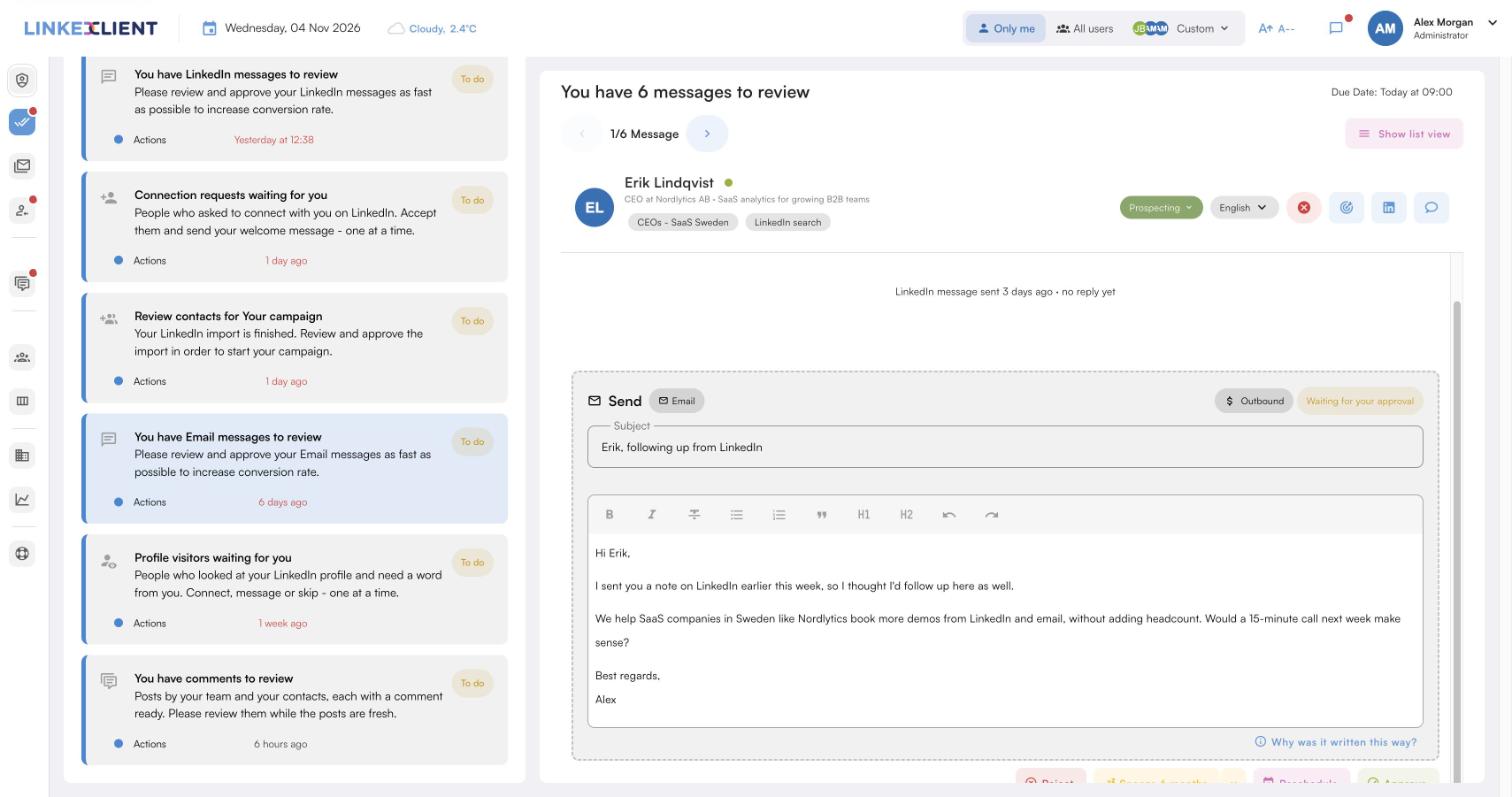
Every email personal
Elsie reads each person’s profile and company before writing.
Your inbox or ours
Send from your own Gmail, Outlook or IMAP account, or LinkedClient-hosted email.
Email and LinkedIn
Follow-ups on the channel most likely to get a reply.
Meetings in your calendar
Elsie agrees a time in the conversation and books it, with no calendar link.
| LinkedClient | At a glance |
|---|---|
| What it is | An AI sales assistant. Elsie finds leads, writes to them on LinkedIn and email, answers replies and books meetings. |
| Free trial | 14 days, no card needed. Then $79 for your first month. |
| Price after that | Starter $149 per user per month, or $129 billed annually. Professional (2+ users) $299, or $249 billed annually. All 109 features in every plan. |
| Works on | LinkedIn Basic, Premium, Sales Navigator and Recruiter |
| Meetings | Booked in the conversation, without calendar links, in Google or Microsoft calendars |
| Connects to | HubSpot, Pipedrive, Salesforce, Zapier, webhooks and a public API |
| Compliance | GDPR and EU AI Act compliant |
| Setup | Live in about 15 minutes, with onboarding from a real person |
Cold emails that turn into meetings
Try it free for 14 days, no card needed, then just $79 for your first month. Or book a 30-minute demo and we’ll show you who Elsie would contact for your business.
What results do LinkedClient customers get?
These results cover all of LinkedClient. Personal emails and LinkedIn messages are behind them.
“We can pinpoint the people we want to contact and actually get meetings with them automatically.”
Keep reading
What is a good cold email template?
Three to five sentences: something about the recipient, one problem, one result and an easy question, with a short, specific subject line.
How long should a cold email be?
Short enough to read on a phone without scrolling, usually under about 100 words.
What is the best subject line for a cold email?
Short and specific to the recipient, such as a trigger event, their company or a mutual connection.
How do you personalise cold emails at scale?
Personalise the subject and first line with one true, specific detail per person, and keep the rest of the template consistent.
How many follow-up emails should you send?
Two to four, a few days apart, each adding something new, ending with a polite close.
Are cold emails legal?
In most countries, B2B cold email is allowed within the rules: GDPR in the EU, with stricter consent rules in some countries, and CAN-SPAM in the US.
How do you write a cold email that gets replies?
Make it about them, keep it to three to five sentences, name one problem and one result, and end with an easy question.
How does LinkedClient write cold emails?
Elsie researches each person and company, writes a short personal email in your tone from your own inbox or ours, follows up and books the meeting. Try it free for 14 days, then pay $79 for your first month.
Want cold emails that book meetings?
Start your free 14-day trial today and Elsie can start this week. If you keep going, your first month is just $79. Or book a 30-minute demo and we’ll show you who she would contact for your business.
14 days free · No card needed · $79 for your first month