Cold email deliverability: SPF, DKIM, DMARC, warm-up and Gmail’s rules
The best cold email in the world is worthless if it lands in spam. Deliverability depends on three things: technical setup, sending behaviour and whether people want your emails. Here is how to get each right, including the rules Gmail has applied to senders since 2024.
Cold email deliverability is whether your emails reach the inbox instead of spam. To protect it, authenticate your domain with SPF, DKIM and DMARC, follow Gmail’s sender guidelines, which require every sender to use SPF or DKIM and bulk senders to keep reported spam below 0.3%, warm up new domains and inboxes slowly, send modest volumes from each inbox, target people who are likely to find your email relevant and make opting out easy. LinkedClient lets you send from your own inbox or LinkedClient-hosted email, within daily limits, and combines email with LinkedIn so you depend less on any single channel. You can try it free for 14 days, no card needed, and your first month after the trial is $79.
Key takeaways
- Set up SPF, DKIM and DMARC.
- Keep reported spam below 0.3%, ideally below 0.1%.
- Warm up new domains slowly.
- Send modest volumes per inbox.
- Relevance is the best deliverability tactic.
What do SPF, DKIM and DMARC do?
| Record | What it does | Needed for |
|---|---|---|
| SPF | Lists the servers allowed to send email for your domain | All senders to Gmail: SPF or DKIM |
| DKIM | Signs each email so receivers can check it wasn’t changed | All senders to Gmail: SPF or DKIM |
| DMARC | Tells receivers what to do when SPF or DKIM fails | Bulk senders to Gmail |
| Reverse DNS | Matches your sending server’s IP to a domain name | All senders |
Google’s guidelines require SPF or DKIM for everyone sending to personal Gmail accounts, and SPF, DKIM and DMARC for bulk senders, defined as close to 5,000 messages a day.
Sources: Google: Email sender guidelines.
What are Gmail’s rules for senders?
Yahoo and Microsoft apply similar rules to high-volume senders. Cold outreach should stay far below bulk volumes, but the same principles protect your domain.
- Authenticate with SPF or DKIM; bulk senders need SPF, DKIM and DMARC.
- Keep the spam rate reported in Postmaster Tools below 0.3%, and aim for below 0.1%.
- Bulk senders must offer one-click unsubscribe on marketing and subscribed messages.
- Use a TLS connection and valid forward and reverse DNS.
- Don’t pretend to be Gmail in your From header.
Sources: Google: Email sender guidelines.
How do you warm up a new email domain?
Use a separate domain
Many teams send outreach from a domain close to their main one, to protect it.
Set up authentication first
SPF, DKIM and DMARC before the first email.
Start with real conversations
A few emails a day to people who will reply.
Increase slowly
Raise volume gradually over several weeks.
Watch your signals
Bounces, replies and spam complaints tell you when to slow down.
How do you keep cold emails out of the spam folder?
For what to write, see cold email templates.
How to test deliverability: send to a few test inboxes at Gmail, Outlook and your own domain, check where the emails land, watch your spam rate in Google Postmaster Tools, and track bounces and replies per inbox.
- Target well. Relevant emails get replies, and replies help inbox placement.
- Verify addresses. Bounces hurt your reputation.
- Keep it plain. Few links, no attachments and no heavy images in a first email.
- Spread sending through the working day instead of in bursts.
- Make opting out easy, and honour it immediately.
How does LinkedClient protect your email deliverability?
Deliverability is mostly about behaviour: relevant emails, modest volumes and steady sending. LinkedClient builds that in: Elsie writes a personal email to each person, sends within the daily limits and working hours you set, and combines email with LinkedIn so you never have to blast either channel.
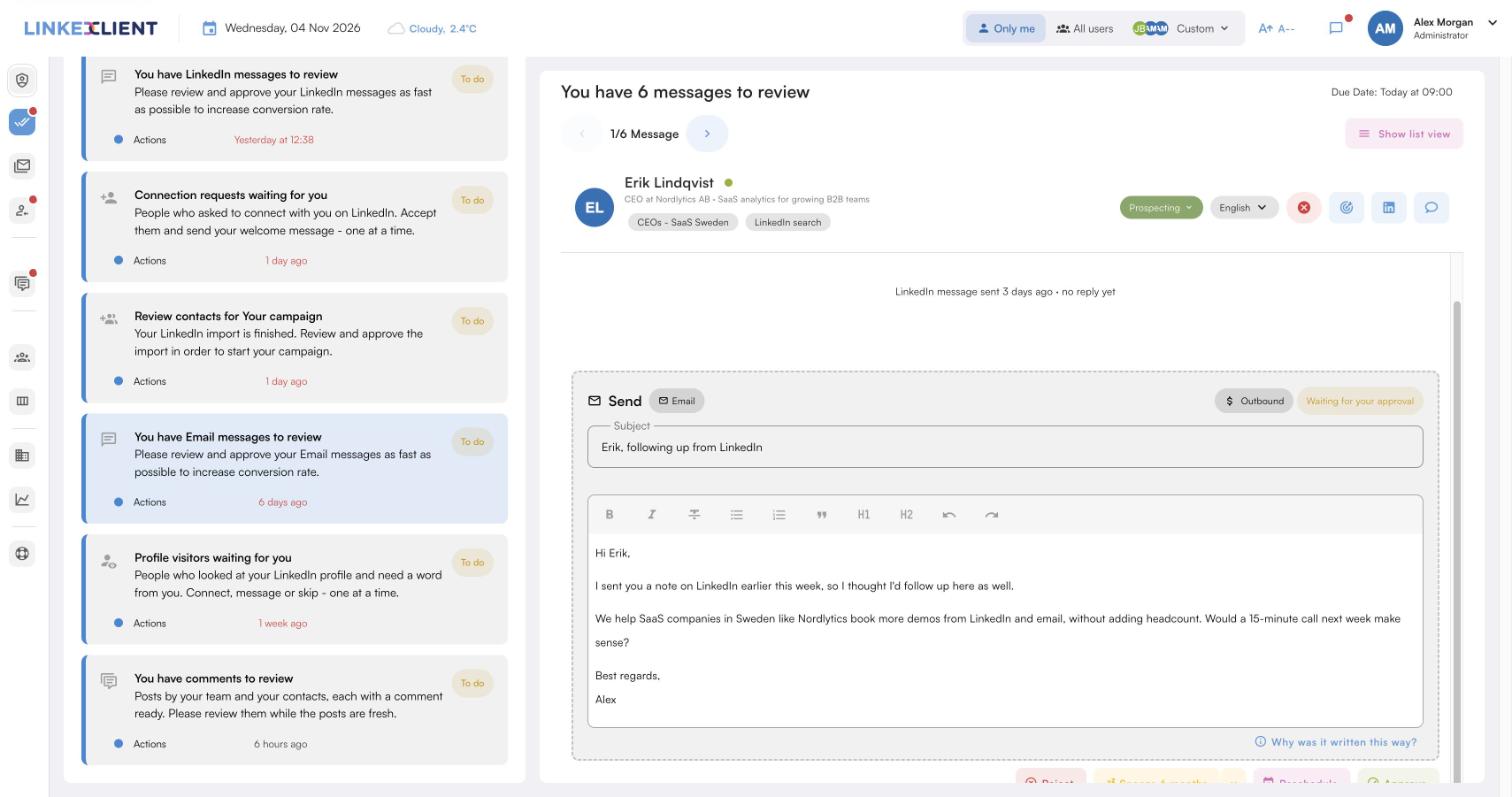
Your inbox or ours
Send from Gmail, Outlook or IMAP, or use LinkedClient-hosted email.
Daily limits
Set the most Elsie may send each day.
Working hours
Emails go out spread across your working days and hours.
Email and LinkedIn
Elsie picks the best channel for each person, so you rely less on volume.
| LinkedClient | At a glance |
|---|---|
| What it is | An AI sales assistant. Elsie finds leads, writes to them on LinkedIn and email, answers replies and books meetings. |
| Free trial | 14 days, no card needed. Then $79 for your first month. |
| Price after that | Starter $149 per user per month, or $129 billed annually. Professional (2+ users) $299, or $249 billed annually. All 109 features in every plan. |
| Works on | LinkedIn Basic, Premium, Sales Navigator and Recruiter |
| Meetings | Booked in the conversation, without calendar links, in Google or Microsoft calendars |
| Connects to | HubSpot, Pipedrive, Salesforce, Zapier, webhooks and a public API |
| Compliance | GDPR and EU AI Act compliant |
| Setup | Live in about 15 minutes, with onboarding from a real person |
Email outreach that reaches the inbox
Try it free for 14 days, no card needed, then just $79 for your first month. Or book a 30-minute demo and we’ll show you who Elsie would contact for your business.
What results do LinkedClient customers get?
These results cover all of LinkedClient. Reaching the inbox is one part of it.
“We can pinpoint the people we want to contact and actually get meetings with them automatically.”
Keep reading
Questions about cold email deliverability
Can’t find your answer? Ask a real person.
Book a 30-min demoWhat is email deliverability?
Whether your emails reach the recipient’s inbox, rather than the spam folder or not at all.
Do I need SPF, DKIM and DMARC for cold email?
Yes. Gmail requires SPF or DKIM for all senders and all three for bulk senders, and they protect your domain’s reputation.
What is a good spam rate?
Google says bulk senders must stay below 0.3% reported spam and should aim for below 0.1%.
How do you warm up an email domain?
Authenticate it, start with a few real conversations a day and increase volume slowly over several weeks while watching bounces and complaints.
How many cold emails can you send per day?
Cold outreach should stay far below bulk volumes. Send modest numbers per inbox, spread through the day, and grow slowly.
Should you use a separate domain for cold email?
Many teams do, to protect their main domain’s reputation. Authenticate it and warm it up properly.
How do you test cold email deliverability?
Send to test inboxes at the main providers, check where emails land, monitor your spam rate in Google Postmaster Tools and watch bounces and replies.
How does LinkedClient handle email deliverability?
You send from your own inbox or LinkedClient-hosted email, within daily limits and working hours, with personal emails and LinkedIn as a second channel. Try it free for 14 days, then pay $79 for your first month.
Want outreach that reaches the inbox?
Start your free 14-day trial today and Elsie can start this week. If you keep going, your first month is just $79. Or book a 30-minute demo and we’ll show you who she would contact for your business.
14 days free · No card needed · $79 for your first month