How to get more likes on your LinkedIn posts
Few likes usually means few people saw the post, or the first lines gave them no reason to stop. Here are 8 ways to get more likes, and how LinkedClient gets your whole team engaging with each other’s posts automatically.
Engage with other people first, because people notice who likes their posts and return the favour. Get your team to like each other’s posts early, since every like shows the post to their network. Then write a first line that makes people stop, post about your audience’s problems, ask one question and reply to every comment quickly. LinkedClient does the engaging for you: choose My team, and every new post from your colleagues gets a like automatically, along with posts from your contacts and network.
Key takeaways
- Engage with others before you post.
- Team likes show each post to every colleague’s network.
- The first line decides if people stop scrolling.
- Reply to every comment the same day.
- LinkedClient likes your team’s and contacts’ posts automatically, within your limits.
How do you get more likes on LinkedIn?
Engage before you post
Like and comment on posts from people you want to reach. Your name shows up in their notifications, and many return the favour.
Get your team behind every post
When colleagues like a post early, it shows up in their networks too. With LinkedClient it happens automatically.
Write a first line that stops the scroll
Most people only see the first lines. Make them specific and about the reader.
Post about your audience’s problems
People like posts that help them or say what they were already thinking.
Ask one clear question
End with a question that is easy to answer in a comment.
Reply to every comment fast
Replies keep the conversation going while the post is fresh.
Post at a steady rhythm
Once or twice a week, every week, beats a burst followed by silence.
Boost your best posts
LinkedIn lets you pay to boost your own posts when you want reach fast.
What gets your LinkedIn posts fewer likes?
| Avoid | Why |
|---|---|
| Buying likes from strangers | They come from people who will never buy, and LinkedIn’s policies count it as fake engagement. |
| Copy-paste comments | “Great post!” under every post gets ignored. |
| Posting and disappearing | Posts where nobody replies to comments tend to stall. |
| Bursts of activity | Dozens of likes in a few minutes look automated. Spread them over the day. |
Reach dropped for no reason? Read about the LinkedIn shadow ban. Want to know who saw your post? See who viewed your LinkedIn post.
Sources: LinkedIn Professional Community Policies.
How does LinkedClient get you more likes and attention?
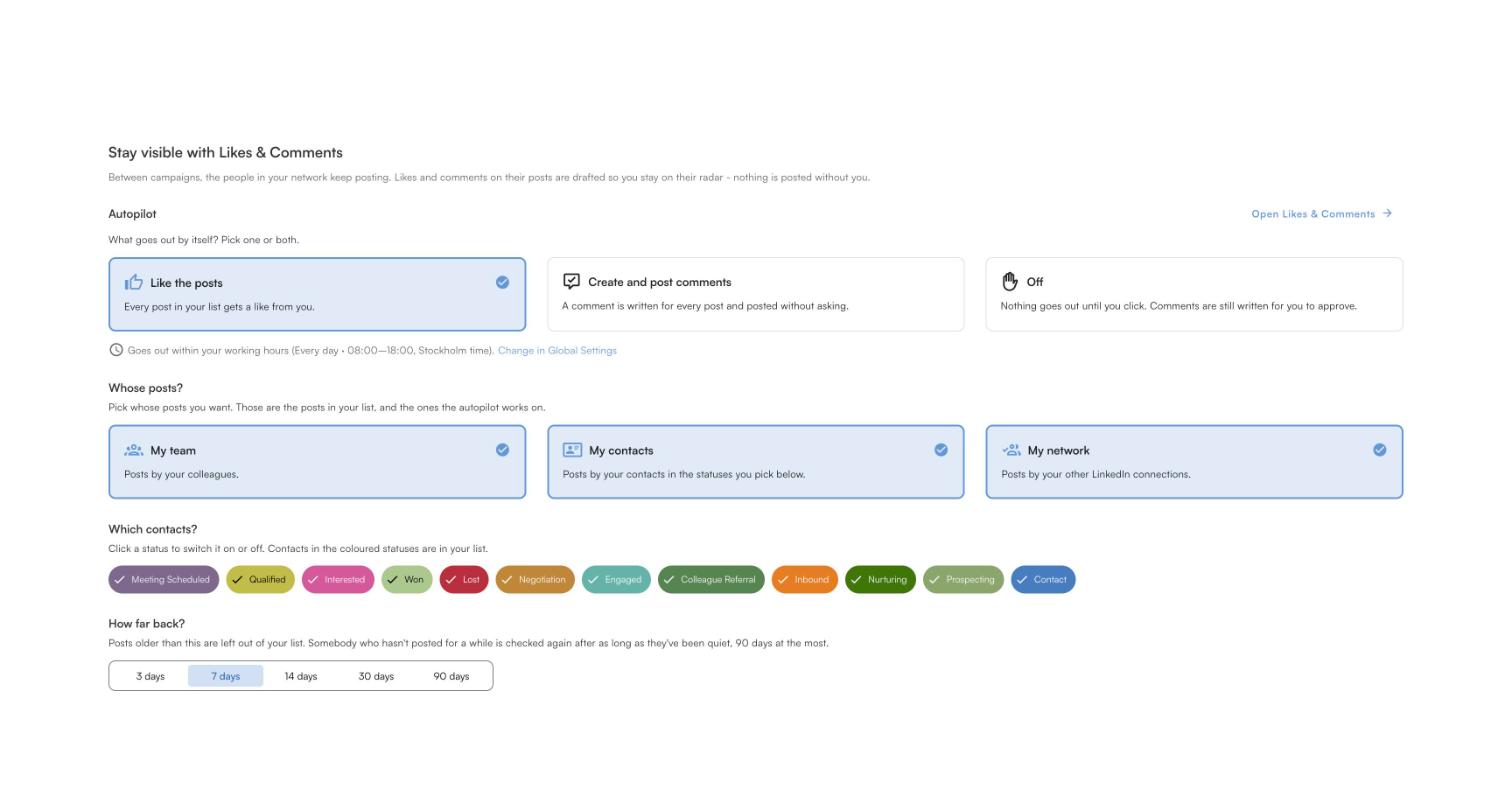
Your team’s posts liked automatically
Choose My team, and every new post from your colleagues gets a like on autopilot, so each post gets early support.
Your contacts see you every day
Elsie likes posts from your prospects and contacts, so your name keeps appearing in their notifications.
Comments written for each post
Each post gets a comment written for it. Post it yourself or let autopilot do it.
Within your limits and hours
Likes and comments go out within your daily limit and only in your working hours.
The more you engage with the right people, the more of them notice you and engage back. See how to automate LinkedIn likes and comments.
Get your whole team engaging, automatically
Book a 30-minute demo and we’ll show you how Likes & Comments works for your team.
What results do LinkedClient customers get?
These results cover all of LinkedClient. Likes and comments are one part of it.
“We can pinpoint the people we want to contact and actually get meetings with them automatically.”
Keep reading
Automate likes and comments
Stay visible without living in your feed.
Read the guideWho viewed your post
What post analytics show, and what only Premium shows.
Read the guideLinkedIn shadow ban
Reduced reach, LinkedIn jail and how to avoid both.
Read the guideGet more profile views
Views from the people you want to sell to.
Read the guideQuestions about getting more LinkedIn likes
Can’t find your answer? Ask a real person.
Book a 30-min demoHow do I get more likes on LinkedIn?
Engage with the people you want to reach before you post, get your team to like your posts early, write a first line that stops the scroll, ask one question and reply to every comment quickly.
Why am I getting no likes on my LinkedIn posts?
Usually because few people saw the post, or the first lines gave them no reason to stop. Check your post analytics: if impressions are low, engage more with your network; if impressions are high but likes are low, rework your opening.
Should my team like my LinkedIn posts?
Yes. Each like from a colleague shows the post to their network. With LinkedClient, choose My team and every new post from your colleagues gets a like automatically, within your daily limit.
Can I automatically like LinkedIn posts?
Yes. LinkedClient likes posts from your team, your contacts and your network on autopilot, within the daily limit you set and only in your working hours.
Is it OK to buy LinkedIn likes?
No. Bought likes come from strangers who will never become customers, and LinkedIn’s policies count it as fake engagement.
How does LinkedClient help with LinkedIn likes?
Elsie likes your colleagues’ and contacts’ posts every day on autopilot and writes comments for you, so your team’s posts get early support and the right people keep seeing your name.
Want more likes and more people noticing you?
Pick a plan and Elsie can start this week. Or book a 30-minute demo and we’ll show you who she would contact for your business.
From €199 per user/month excl. VAT · Human onboarding included